
If you are a frequent internet user, chances are you have stumbled across a dead link recently, only to find yourself staring at an error page for a service called NippyBox. For a brief period, this lightweight cloud storage platform was a highly discussed solution for fast, anonymous file sharing. Whether you were a freelancer sending a quick mock-up or a student sharing study materials, it offered a seemingly frictionless experience.
But what exactly happened to it? If you are searching for NippyBox today, you are likely trying to figure out if the platform is experiencing a temporary outage or if it has been permanently shut down. You might also be wondering what to do with a "nippyfile" you desperately need to download.
In this comprehensive guide, we will unpack the rise and fall of NippyBox. We will explore the core features that made it popular among remote workers and casual internet users alike. We will also dissect the operational issues and regulatory pressures that led to its disappearance, the severe security risks associated with modern "clone" sites, and the most secure, reliable alternatives you should be using for your file-sharing needs.
What Was NippyBox? Core Concept and Target Audience
At its core, NippyBox was an online file hosting and sharing platform designed with one primary goal: removing the friction from digital data transfers. In an era where legacy cloud providers increasingly demanded account creation, verified email addresses, and software downloads, this platform offered a refreshing, streamlined alternative.
The Target Audience
The platform was custom-built for users who needed to move data from point A to point B without adopting a complex cloud ecosystem. Its user base primarily consisted of:
Freelancers and Creatives: Sending design assets, photographs, or audio files quickly to clients without worrying about restrictive corporate email attachment limits.
Small Remote Teams: Sharing essential documents efficiently across borders.
Casual Everyday Users: Distributing large home videos or photo batches with family members.
Understanding the "Nippyfile"
When a user uploaded a piece of data to the platform—be it a PDF, an MP4 video, or a ZIP archive—the resulting hosted asset was colloquially referred to as a "nippyfile." These files generated a unique URL that could be pasted into an email, an instant message, a forum post, or an online community. The recipient simply clicked the link, and the download process began immediately, bypassing intrusive advertisements or forced waiting periods that plagued many other free file lockers.
Key Features That Drove Its Popularity
NippyBox did not invent online file hosting, but it perfected a specific niche. Its rapid adoption was driven by a combination of ease of use and impressive technical claims that catered perfectly to its demographic.
1. Frictionless, User-Friendly Interface
The platform's dashboard was famously minimalist. Users were greeted with a massive, unmissable drag-and-drop zone. There were no complex folder hierarchies to navigate during the initial upload or onboarding tutorials to skip. You dropped a file, you received a link, and you moved on. This zero-learning-curve approach made it highly accessible, even for non-technical users.
2. Privacy and Security Claims
For privacy-conscious individuals and businesses, the platform marketed itself as a highly secure vault. Key security features included:
End-to-End Encryption (E2EE): The platform claimed to lock files with strong encryption during both transfer and storage, ensuring that data remained unreadable to unauthorized parties.
Zero-Knowledge Architecture: The service heavily promoted the idea that its administrators could not view the contents of user uploads.
TLS 1.3 Backing: The platform's connections were secured by solid TLS 1.3 protocols, guaranteeing safe transmissions.
Two-Factor Login: For account holders, it offered an extra layer of security, making it harder for intruders to access stored data.
3. Flexible Sharing Controls
Despite its simplicity, the platform offered robust controls for the sender. Users could generate permission-based links, establishing exactly who could view or download the hosted digital content. This frictionless, client-friendly sharing approach was one of its most praised standout features.
4. Storage Limits and Scalability
During its operation, it catered to different tiers of users. Free users enjoyed generous storage capabilities for quick tasks, while premium subscribers unlocked unlimited capacity, automated backups, and more advanced organization tools like custom folders and file version tracking.
The Shutdown Controversy: What Happened to NippyBox?
If the service was so functional and popular, why is every link dead today? The downfall of the platform serves as a cautionary tale about the operational realities of running an anonymous file-hosting service.
The 2025/2026 Outages
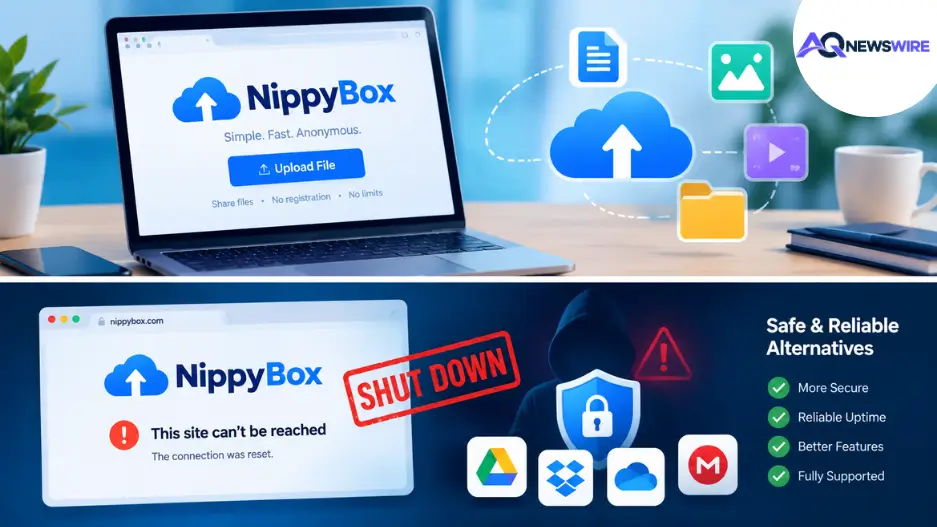
Trouble began brewing around mid-2025. Users started reporting widespread server timeouts, 404 errors on active links, and an inability to log into their dashboards. What started as intermittent downtime quickly spiraled into a total blackout. Today, the current availability of the original service is highly uncertain, with most signs pointing to a permanent discontinuation of operations.
Legal and Compliance Challenges
The very features that made the platform popular—anonymity, encryption, and frictionless sharing—made it a haven for illicit activity. Like many file lockers before it, it fell into a common trap:
Copyright Infringement: Anonymous file-sharing communities sometimes distribute unauthorized resources, project files, and digital materials.
DMCA Takedowns: Companies offering such services are inevitably hit with thousands of Digital Millennium Copyright Act (DMCA) notices. Because of its purported zero-knowledge architecture, administrators struggle to comply with takedown requests efficiently.
Regulatory Scrutiny: Increased pressure from international regulatory bodies (such as Ofcom) regarding the hosting of unmoderated content makes the legal costs of running the service unsustainable. The infrastructure simply buckles under the weight of compliance demands and soaring server costs.
Urgent Safety Warning: Beware of Clone Sites
If you search for the platform today, you will find several websites sporting the familiar name and logo. Proceed with extreme caution. The original entity is defunct. These newly popped-up "clone" websites are often run by anonymous third parties attempting to capitalize on the defunct brand’s residual SEO traffic.
Using these clones poses severe risks:
Malware Distribution: Files downloaded from unverified clones may be injected with ransomware or spyware. Users should be incredibly cautious about downloading files from unknown sources.
Data Harvesting: These sites lack transparent privacy policies and may harvest your IP address, email, and uploaded files.
Zero Security: The strict encryption protocols promised by the original site are almost certainly absent on these imitation platforms.
Top Secure Alternatives to NippyBox
With the original platform largely offline, you need a safe, reliable place to host and share your data. Depending on your specific workflow, here are the best modern alternatives.
For Quick, Temporary File Transfers
If you simply need to send a file to a client without forcing them to log in, these platforms are your best bet:
WeTransfer: The reigning champion of quick file sharing. The free tier allows you to send up to 2 GB of files via a simple email link. It is highly secure, requires no account for the recipient, and files automatically expire, keeping your digital footprint clean.
Send Anywhere: Perfect for direct device-to-device transfers. It utilizes a key system to pair devices in real-time, meaning the file is transferred directly rather than sitting on a vulnerable cloud server indefinitely.
YoloBit: An online file-sharing platform that allows users to seamlessly upload and share files up to 100 MB in size without hassle.
For Long-Term Cloud Storage & Collaboration
If you need a permanent home for your files and want to collaborate with others, look toward established enterprise-grade software:
Summary Takeaway
While NippyBox served a specific, highly in-demand niche for quick and frictionless file hosting, the realities of the modern internet make unregulated file lockers unsustainable. The platform's demise highlights the importance of trusting your data only to transparent, established entities. Encourage your peers to audit their old shared links and transition active workflows to reliable platforms like Google Drive, Mega, or WeTransfer to ensure data remains accessible and protected.
Frequently Asked Questions (FAQ)
1. Is NippyBox permanently down?
Yes, current availability indicates that the original service has ceased reliable operations due to insurmountable legal and operational challenges. Searching "is NippyBox down" will confirm its discontinuation rather than a temporary server outage.
2. Is it safe to use a site called NippyBox today?
No, you should proceed with extreme caution. The original entity is defunct, meaning any site currently using the name is likely an unauthorized clone. These sites often lack transparent ownership and pose severe malware and data security risks.
3. How can I recover old Nippyfiles?
Recovering data from a dead link is highly unlikely. You must check your original local hard drives, search your email for the original attachments, or ask the sender to re-upload the file to a stable platform.
4. Is NippyBox the same as Nippyshare?
No, they were distinct file-sharing entities operated by different people. However, both platforms shared a similar frictionless business model and ultimately faced identical regulatory scrutiny that led to their respective downfalls.
5. What is the file size limit for modern alternatives?
It varies by platform. YoloBit supports quick 100 MB uploads, WeTransfer allows up to 2 GB for free users, and Mega offers ample free storage depending on the user's account configuration.
6. Are clone sites legal to use?
While visiting a clone site isn't inherently illegal, uploading or downloading copyrighted material remains against the law. Furthermore, utilizing unverified platforms puts your personal device at major risk of infection.
7. Can clicking an old link give me a virus?
Clicking a dead link that results in a standard 404 error is harmless. However, if a malicious third party has purchased the expired domain and redirected the link to a phishing site, your device could be compromised.
8. Why do anonymous file-sharing sites shut down so often?
They are highly expensive to run and incredibly difficult to moderate. Without strict user verification, they become targets for DMCA takedowns and server hosting bans.
9. What does E2EE mean in file sharing?
End-to-End Encryption (E2EE) means the data is encrypted on your device before it is uploaded. It remains scrambled while in transit and in storage, ensuring the hosting provider cannot read it.
10. Do I need an account to download files from modern alternatives?
Usually, no. Platforms like WeTransfer and Google Drive allow recipients to securely download files via shared links without forcing them to register for an account.